Is WordPress Secure? The Supply-Chain Risk No Plugin Update Can Fix
Erik Palmquist · 8th and Palm · July 10, 2026
Your WordPress plugins can be completely up to date and your site can still be compromised through them. That’s the uncomfortable lesson from a run of recent attacks — including one in June 2026 that exposed up to 1.2 million sites (Sansec) — where the malicious code didn’t slip in through a plugin somebody forgot to update. It arrived through plugins that were doing exactly what they were trusted to do.
This isn’t a scare piece, and it isn’t a claim that WordPress is uniquely broken. It’s a plain look at a specific kind of risk that’s been growing fast: the plugin supply chain. Once you see how it works, you’ll understand why “just keep everything updated” — the advice every WordPress owner is given — misses the problem entirely.
The June 2026 Wake-Up Call
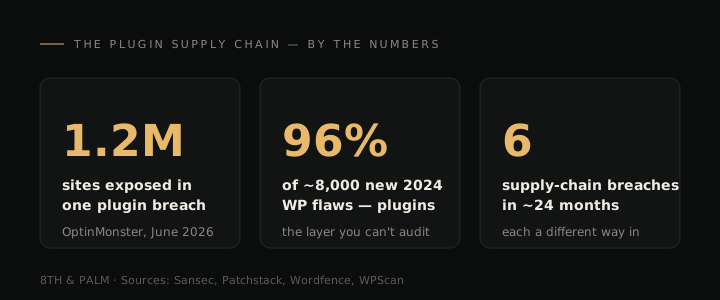
Three popular marketing plugins — OptinMonster, TrustPulse, and PushEngage, all published by the same company — were caught serving tampered code to live websites (Sansec, Patchstack). Together they run on roughly 1.2 million sites.
The mechanism is simpler than it sounds. These plugins each load a small helper script from their vendor’s own servers every time a page runs. An attacker got into that server and swapped the script. So when a logged-in administrator opened a page on an affected site, the script quietly created a hidden admin account and installed a concealed backdoor, all using the administrator’s own session — which is exactly why it looked like normal activity.
The plugin sitting on your site was never modified. There was no bad update to avoid. The tampering happened upstream, on the vendor’s infrastructure, and rode in through a script your perfectly current plugin was designed to fetch. (If you ran any of those three plugins in mid-June, it’s worth reading our guide on what to do when a WordPress site is compromised.)
”But I Keep Everything Updated” — Why That Didn’t Matter
It’s tempting to assume the sites that got hit were the neglected ones, running months-old plugins. Be honest about it: some of the 1.2 million were diligently maintained, and plenty weren’t. It made no difference either way.
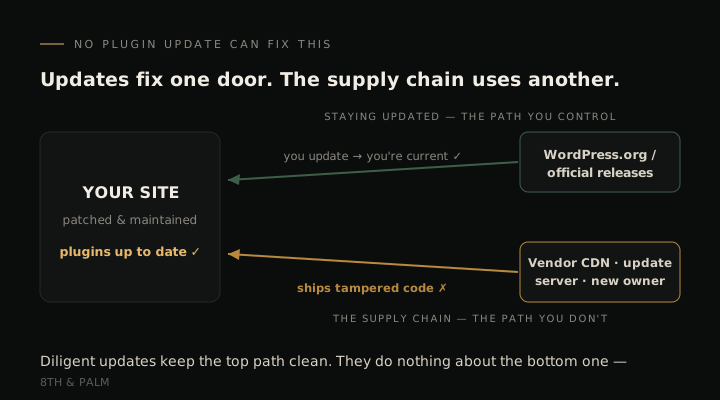
It made no difference because the malicious code never came through a plugin update. The plugin files were untouched. Whether your copy was the newest version or a year behind, your site fetched the same tampered script from the same vendor server the moment an admin loaded a page. A meticulously updated site and a badly neglected one were equally exposed.
That’s the whole point. Keeping plugins updated is good hygiene, and you should absolutely do it, but it’s aimed at one kind of threat: known bugs in code you’ve already installed. The supply chain is a different door. Updating guards the door you control. It does nothing about the one you don’t.
This Wasn’t a One-Off — It’s a Pattern
If the OptinMonster incident were a freak event, it wouldn’t be worth rebuilding your thinking around. It isn’t. The same basic move — compromise something a lot of sites already trust, then let that trust carry the payload — has played out over and over, each time through a different door.
The official download itself (Gravity Forms, 2025). Attackers compromised Gravity Forms’ own distribution and slipped a backdoor into the plugin’s core files. Copies downloaded on July 10–11, 2025, phoned home to an attacker’s server, created an admin account, and blocked update attempts (BleepingComputer, Patchstack). Gravity Forms runs on around a million sites, including names like Nike and Google.
The vendor’s own website (AccessPress, 2021). Attackers breached AccessPress Themes and planted a backdoor across 40 themes and 53 plugins. Tellingly, the copies on the official WordPress.org directory were clean — only the versions downloaded straight from the vendor’s site were poisoned (Jetpack, BleepingComputer).
A reused developer password (five WordPress.org plugins, 2024). Attackers logged into five plugin developers’ accounts using passwords exposed in old data breaches, then pushed updates that injected admin accounts, SEO spam, and crypto-miners onto roughly 35,000 sites (Wordfence).
A quiet ownership change (EssentialPlugin, 2025–26). A buyer acquired more than 30 plugins through the Flippa marketplace, inherited the ability to update around 400,000 sites, tucked dormant code into a routine “compatibility” update, and switched it on eight months later (Patchstack). Nobody running those plugins was told the owner had changed.
The update server itself (Smart Slider 3 Pro, 2026). Attackers hijacked the plugin’s official update channel and pushed a backdoored build to sites that did exactly what they’re told to do — update promptly. Around 900,000 installations were in range (The Hacker News, Patchstack).
A third-party script (Polyfill, 2024). A widely used helper script turned hostile after its domain was sold to a new owner, and began serving malware to visitors of the 100,000-plus sites that loaded it (Sansec).
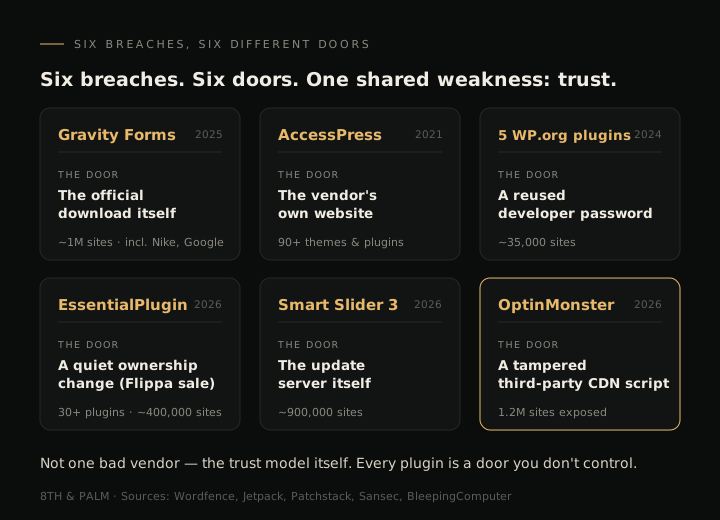
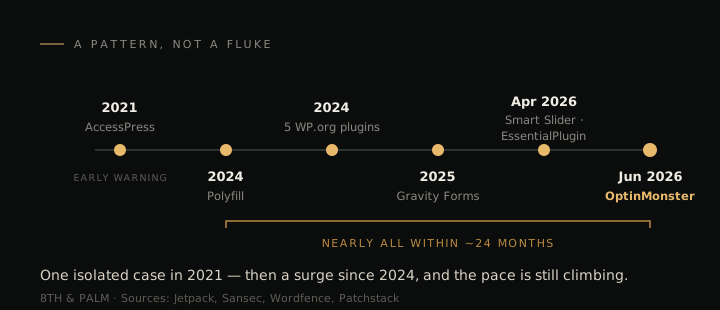
That’s six incidents and six different entry points, all turning on the same thing: the trust a site places in the code it pulls in. And the pace isn’t slowing. Five of the six landed within roughly the last two years.
Why This Is Structural, Not Bad Luck
It’s easy to write these off as a few careless vendors. But look at the list again: an official download, a vendor website, a stolen password, a plugin sale, an update server, a shared script. No single vendor slip-up explains all six. What they have in common is the model itself — one where your site continuously runs code from other people, code that updates itself and often reaches out to still more servers you’ve never heard of.
That’s what a plugin actually is: someone else’s software, running with a high level of access to your site, updating on its own schedule. A typical service-business site stacks 20 to 30 of these relationships. Each one is a standing bet that the vendor is careful today, that their servers aren’t breached, that they haven’t sold the plugin to someone with worse intentions, and that every script the plugin loads is safe too.
The scale of the exposure is easy to underrate. WordPress disclosed nearly 8,000 new security vulnerabilities in a single year, and 96% of them came from plugins rather than WordPress itself (Patchstack / WPScan). We covered that number in depth in the WordPress security problem no one’s talking about — and the supply-chain attacks here are the sharper edge of the same underlying issue: every plugin you add is another moving part you’re trusting.
”A Security Plugin Will Catch It” — The Limits of the Usual Defenses
The natural response is to reach for the standard toolkit: a security plugin, a firewall, a maintenance service. Each is worth having. None of them addresses this.
A firewall can’t stop your visitors’ browsers from loading a script your plugin is designed to fetch from a trusted vendor — that request looks completely legitimate, because it is legitimate, right up until the file on the other end is swapped. Updates don’t help when the update is the attack, as with Smart Slider and the five WordPress.org plugins. And a maintenance plan keeps your software current; it doesn’t audit who now owns each plugin or inspect what that plugin’s servers are serving today. These defenses guard the doors you already know about. The supply chain keeps using new ones.
What a Business Owner Can Actually Do
None of this means panic, and it doesn’t mean WordPress is worthless. It means being clear-eyed about how much trust your site hands out, and trimming it where you can:
- Take inventory. Know every plugin on your site and who makes it. Most owners can’t name half of theirs.
- Cut what you don’t need. Every plugin you remove is one fewer standing bet. If a feature isn’t earning its keep, delete it.
- Watch for ownership changes and abandoned plugins. A plugin that goes quiet, or changes hands without warning, is exactly the setup behind the Flippa and Polyfill cases.
- Keep updating anyway. It still closes the ordinary vulnerabilities, which are the far more common threat. Just understand what it can’t reach.
That last point is the honest limit. You can do all of this well and still be exposed, because the deciding factor — how many pieces of third-party code your site runs, and how much you’re forced to trust each one — is baked into the platform’s design.
The Version of This Problem That Doesn’t Exist
There’s a quieter option that removes the category instead of managing it: don’t run the plugins in the first place.
A modern, custom-built site has no plugin layer to compromise, no third-party code updating itself in the background, and no vendor scripts loading while an admin is logged in. There’s simply no supply chain to poison, because the site isn’t assembled out of dozens of other people’s plugins and scripts. It’s the same reasoning behind why so many owners now compare WordPress with a modern static build, and why a growing number treat migrating off WordPress as a security decision as much as a performance one.
You don’t have to take that step to benefit from this. But the entire class of attack described above — the one no update can fix — exists only because the site depends on code it doesn’t control. Remove the dependency and you remove the risk.
If you’re not sure how many third-party dependencies your current site is carrying — or what a plugin-free build would look like for your business — you can reach out for a free assessment. No pressure, just a clear picture of where you stand.
Frequently Asked Questions
Q: Is WordPress secure? A: WordPress core is actively maintained and reasonably secure on its own. The risk for most businesses isn’t core — it’s the plugins. Nearly 8,000 new WordPress vulnerabilities were disclosed in a recent year, and about 96% came from plugins (Patchstack / WPScan). The supply-chain attacks in this article are a step beyond ordinary bugs: they compromise trusted plugins and the scripts they load, so even a fully updated site can be affected.
Q: What is a supply-chain attack in plain terms? A: Instead of breaking into your site directly, the attacker compromises something your site already trusts — a plugin vendor’s server, an update channel, a shared script, or a plugin’s new owner — and lets that trust deliver the malicious code. Your site pulls it in automatically, the same way it pulls in any legitimate update or script.
Q: If I keep my plugins updated, am I safe from this? A: Not from this specific risk. Updating protects you from known bugs in code you’ve already installed, and it’s worth doing. But in several of these incidents the malicious code arrived through the update itself or through a vendor’s server, not through an out-of-date plugin. Diligently updated sites and neglected ones were hit alike.
Q: Will a security plugin or firewall stop a supply-chain attack? A: They help with many threats but not reliably with this one. A firewall can’t block your browser from loading a script your plugin is designed to fetch from a trusted vendor, and it can’t tell that the file was swapped. Updates don’t help when the update is the payload. These tools guard the doors you already know about.
Q: Does moving off WordPress actually remove this risk? A: It removes this particular class of risk, because a custom-built site with no plugins has no plugin supply chain to compromise — no third-party code updating itself and no vendor scripts loading in the background. It’s not a magic shield against every possible problem, but the specific attack described here depends on running code you don’t control, and a plugin-free site simply doesn’t.