The Accessibility Widget Trap: Why ADA 'Compliance' Plugins Get Businesses Sued
Erik Palmquist · 8th and Palm · June 11, 2026
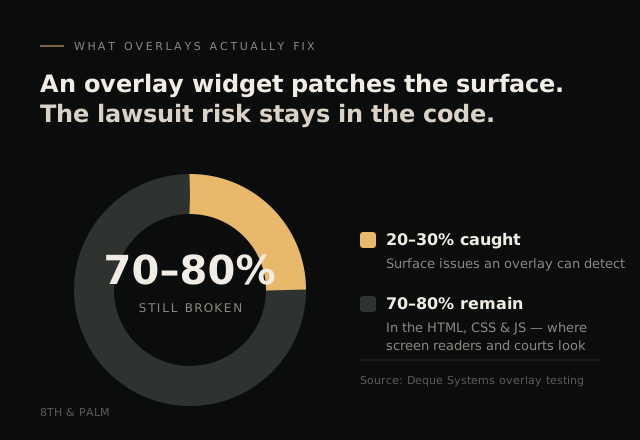
An accessibility overlay widget will not make your website ADA-compliant, and it may actually raise your risk of being sued. Independent testing found these tools catch only 20–30% of accessibility issues, leaving the rest in your code (Deque Systems). If you installed one to feel protected, this is worth ten minutes of your time.
This isn’t a scare piece, and it isn’t legal advice. It’s a practical look at what these widgets actually do, why courts have stopped accepting them, and what genuinely protects a service business.
What an Accessibility Overlay Actually Is
An accessibility overlay is a single line of JavaScript you paste into your site. It loads a little toolbar, usually a person-shaped icon in the corner, that lets visitors adjust contrast, font size, or spacing. Vendors like accessiBe, UserWay, and AudioEye market these as a fast, cheap path to ADA compliance: one script, one monthly fee, problem solved.
The pitch lands because real accessibility sounds hard. If a $49/month widget makes the legal worry go away, why wouldn’t you?
It doesn’t make the worry go away, though. It just moves it behind an icon.
Why the “Fix” Doesn’t Fix Anything
Web accessibility is governed by the Web Content Accessibility Guidelines (WCAG), the standard for making sites usable by people who rely on screen readers, keyboard navigation, and other assistive technology. Meeting that standard is mostly about how a site is built: proper heading structure, labeled form fields, alt text, color contrast, and markup that assistive tech can actually parse.
An overlay can’t change any of that. It sits on top of your existing code and tries to patch the surface at load time. Independent research by Deque Systems found overlays detect roughly 20–30% of WCAG issues, which means 70–80% of the barriers stay exactly where they were, in the underlying HTML, CSS, and JavaScript.
Worse, overlays frequently interfere with the assistive technology they claim to help. Screen reader users have widely reported that overlays fight with their own software, creating new barriers on top of the old ones. That’s why accessibility advocates, the people these tools are supposedly built for, are among their loudest critics.
The Lawsuits Are Real, and Climbing
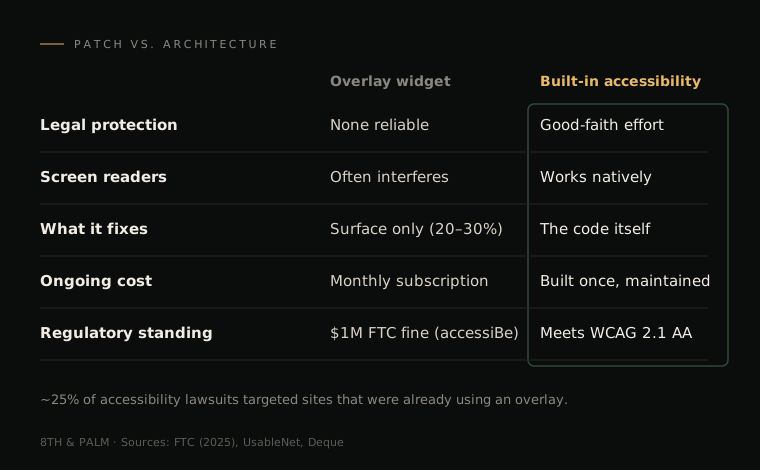
ADA website lawsuits have become a genuine business risk, not a hypothetical one. More than 15,000 have been filed since 2022 (25 Investigates analysis of court records), and the number climbs every year. Plaintiffs’ firms increasingly target small businesses, because smaller sites tend to have more gaps and tend to settle quickly.
The part that catches owners off guard: installing an overlay can make you a bigger target, not a smaller one. According to UsableNet’s tracking, roughly 25% of digital accessibility lawsuits in a recent year named businesses that were already using an overlay widget. The overlays were cited as part of the problem, not as evidence of good faith.
And in 2025, the FTC fined accessiBe, one of the largest overlay vendors, $1 million for deceptive claims that its product could make any website compliant. When the federal government is fining the vendor for the exact promise that sold you the product, that promise is not a legal defense.
The Standard Everyone Is Now Measured Against
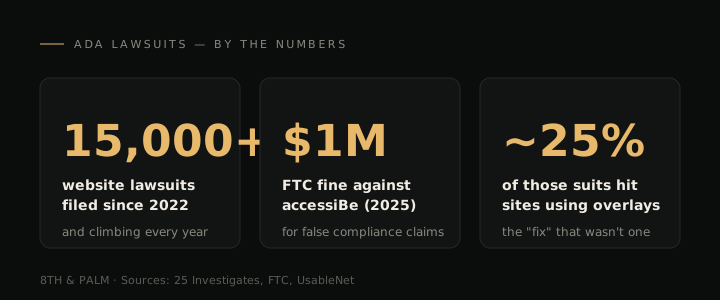
In 2024, the Department of Justice formally adopted WCAG 2.1 Level AA as the technical standard for web accessibility, with compliance deadlines of April 2026 and April 2027 for state and local government entities. Private businesses fall under a different part of the law and don’t have that exact calendar, but the practical effect is the same: courts now treat WCAG 2.1 AA as the benchmark for everyone, and the government deadlines made it the universally referenced standard.
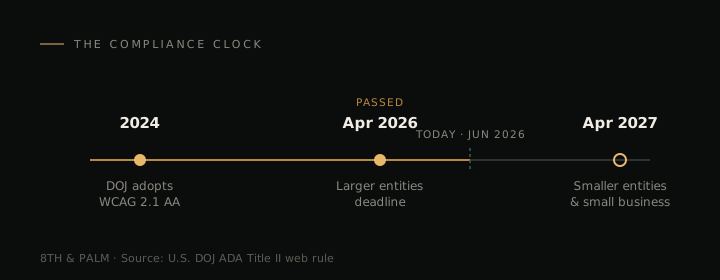
So the bar is clear, and it isn’t “did you install a widget.” It’s “is your site actually built to WCAG 2.1 AA.” A toolbar in the corner doesn’t answer that question; the code underneath does.
Why This Is So Often a WordPress Story
It’s worth being fair to WordPress here, because a lot of advice gets this part wrong. WordPress core is actually built with accessibility in mind: the project has an accessibility team and coding standards, and the modern Gutenberg block editor produces clean, semantic markup. A site built from a clean sheet with core WordPress and a well-made theme can absolutely meet WCAG 2.1 AA. WordPress isn’t broken, and it isn’t inaccessible by nature.
The trouble is that almost nobody runs WordPress that way. Two things tend to pull a real-world WordPress site off the standard.
First, the plugins. A typical service-business site runs 15–25 plugins, and accessibility is rarely on the checklist when they’re chosen. A booking widget, a form builder, a popup tool, a review carousel: any one of them can inject unlabeled fields, poor contrast, or markup a screen reader can’t follow. The same plugin sprawl that keeps WordPress sites breaking quietly introduces accessibility gaps you never see, because each plugin is a separate piece of software with its own standards, or none.
Second, and this is the one most people miss, how the pages themselves are built. Most WordPress sites are assembled with a visual page builder like Elementor, Divi, or WPBakery. These tools are powerful precisely because they let anyone drag, drop, and style a page without touching code, which also means anyone can build a page with no regard for heading structure, color contrast, or reading order. A heading that’s really just big bold text. Light-gray copy on a white background because it “looked clean.” Three H1s on one page, or none. So even if every plugin on the site were perfectly accessible, the pages could still fail, because they were built by eye rather than by structure.
That’s the real issue. Accessibility lives in the markup and in the way each page is constructed, and a drag-and-drop workflow makes it easy to ignore both. An overlay can’t fix a page that was built without structure in the first place. It’s the same patch-the-surface pattern behind WordPress’s security problem, just applied to accessibility.
What Actually Protects Your Business
Real accessibility is done in the build, and it’s far less mysterious than the vendors make it sound. A site built correctly handles the large majority of WCAG 2.1 AA out of the box:
- Semantic structure — real headings, landmarks, and lists that screen readers can navigate.
- Labeled forms — every field has a label and clear error messages.
- Keyboard operability — everything works without a mouse.
- Sufficient color contrast — text is readable for low-vision users.
- Alt text — images carry meaningful descriptions.
A modern, hand-built site bakes these in from the start, which is why accessibility and performance tend to travel together: clean, lightweight markup is easier for both assistive tech and Google to read. (It’s the same clean-code advantage behind Core Web Vitals.) When accessibility is part of the architecture, you’re not paying a monthly subscription to hide a problem; you’ve removed it.
This is increasingly why business owners treat a migration off WordPress as a risk-reduction decision, not just a design refresh. The verticals we work with, law firms and dental and accounting practices, are exactly the higher-trust businesses that both care about accessibility and get targeted when they fall short.
How to Check Where You Stand
You don’t need to guess. A quick gut-check:
- Look for the overlay. If you have a floating accessibility icon and you’re relying on it for compliance, treat that as a red flag, not a green light.
- Try your own site with a keyboard. Unplug your mouse and tab through your homepage and contact form. If you can’t reach or submit everything, neither can a keyboard-dependent visitor.
- Run an automated check. Free tools like WAVE or Google Lighthouse will surface obvious issues: missing alt text, low contrast, unlabeled fields.
- Ask who built your site: was it built to WCAG 2.1 AA, or was an accessibility plugin added later? The answer tells you whether you have architecture or a band-aid.
If those answers make you uneasy, it’s worth an honest conversation about your options. You can reach out to us directly; no pressure, just a clear look at where your site actually stands.
Frequently Asked Questions
Q: Is ADA compliance mandatory for websites? A: Courts have consistently treated the websites of businesses open to the public as covered by the ADA, and WCAG 2.1 AA has become the de facto standard they’re measured against. There’s no “small business exemption” that’s protected defendants in practice. In fact, small businesses are increasingly the targets, because they’re seen as quicker to settle.
Q: Can I be sued for my website not being ADA compliant? A: Yes. More than 15,000 ADA website lawsuits have been filed since 2022 (25 Investigates), and a large share target small businesses. This isn’t legal advice, and your specific exposure depends on your situation, but the trend is clear and the volume is real.
Q: I installed an accessibility widget. Doesn’t that protect me? A: Not reliably. Overlays catch only 20–30% of issues (Deque Systems), courts have rejected the “we added an overlay” defense, roughly 25% of accessibility lawsuits named sites already using one (UsableNet), and the FTC fined overlay vendor accessiBe $1M in 2025 for overstating what it could do. A widget is not a substitute for an accessible site.
Q: How do I know if my website is actually ADA compliant? A: Compliance means conforming to WCAG 2.1 AA: proper structure, labeled forms, keyboard operability, contrast, and alt text. Automated tools (WAVE, Lighthouse) catch the obvious problems, but full conformance requires checking how the site is built. If accessibility was a plugin added after the fact, or the pages were assembled in a visual builder without regard for structure, assume there are gaps.
Q: Does migrating off WordPress automatically make my site accessible? A: Not automatically. Accessibility depends on how the new site is built, not just the platform, and a clean-sheet WordPress build can meet the standard too. But a site built to WCAG 2.1 AA from the start, page by page, removes the underlying barriers an overlay can only paper over, which is a far stronger position than bolting a widget onto an aging site.